
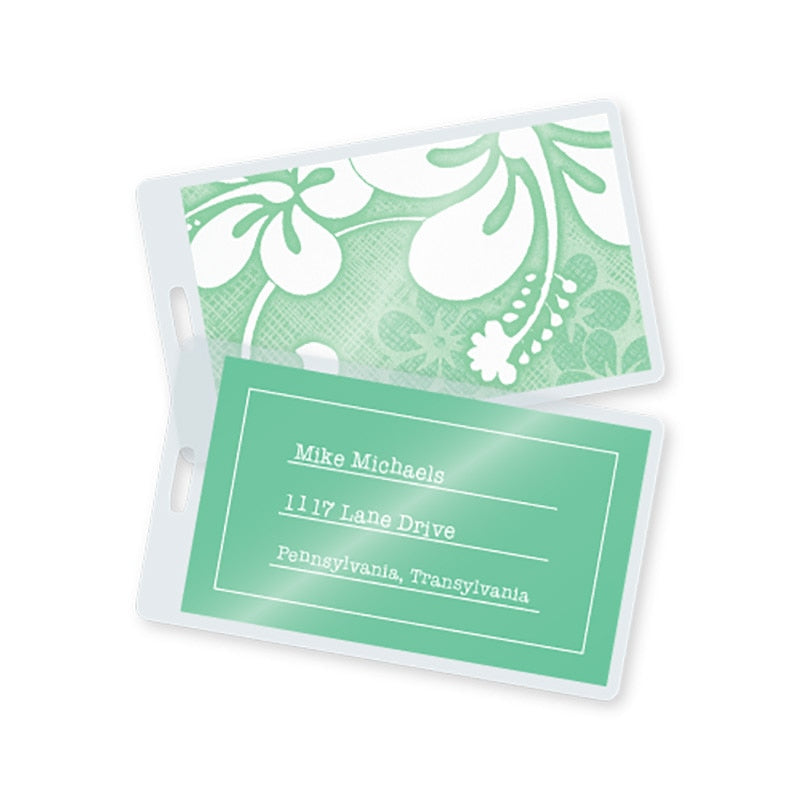
TruLam 7 Mil Laminating Pouches with Short Side Slot, Luggage Tag Size, 2-1/2" x 4-1/4", 500/Bx
TruLam 7 Mil Laminating Pouches with Short Side Slot, Luggage Tag Size, 2-1/2" x 4-1/4", 500/Bx is backordered and will ship as soon as it is back in stock.
Couldn't load pickup availability
TruLam thermal laminating pouches are compatible with all popular laminating machine models, including laminators from TruLam, Akiles, Sircle, Tamerica, Banner, Purple Cows, GBC, Fellowes, and Scotch. These laminating sheets are made of high-quality, high-clarity laminating film and premium adhesive resins for crystal clear laminated documents.
These thermal laminating pouches feature a pre-punched slot that is ideal for creating ID cards, badges, and luggage tags. You will need to increase the margin around your document to account for the slot, which measures 1/8" x 5/8". To use, simply center your document inside the laminating pouch and insert it into a pre-heated pouch laminator (following the manufacturer's instructions for setting the machine based on the thickness of the pouch).
Helpful Tips
Helpful Tips
- Not every laminator requires carrier sheets. As a general guideline, laminators that use silicone rollers do not need a carrier sheet (refer to the operation manual for your specific machine). However, we still include carrier sheets with all pouches. Carriers protect pouches from scratches, and protect your laminator from any excess adhesive oozing out. They also prevent small pouches from wrapping around the rollers and causing jams.
- Leave a minimum border of 1/8". This ensures a lasting seal. Trimming the pouch flush to the insert document will expose the edges of the paper and will lead to delamination over time.
- Ideal for use on prints with light-to-medium ink coverage. For other documents that have medium-to-full coverage or are printed with oil-based toners, we recommend digital roll laminating film, which offers a more aggressive adhesive and activates at a lower temperature to protect prints from heat damage.
- Coming out cloudy? Working in small increments, increase the laminating temperature in stages until the pouch is completely clear and flat. You can run a cloudy pouch through your laminator more than once in order to fully activate the adhesive without damaging the pouch or the insert document.
- Coming out warped/wavy? The temperature is set too high and needs to be decreased. After adjusting the temperature, allow the laminator to cool for a few minutes to ensure that it has reached the specified temperature before inserting a new pouch.
TruLam 7 Mil Laminating Pouches with Short Side Slot, Luggage Tag S...
Product Specifications
Product Specifications
What temperature should I use?
What temperature should I use?
This information is supplied as a general guideline. Quite often, the laminating temperature will vary depending upon the type of material you are laminating, the accuracy of your machine's thermostat, and many other factors.
As a general rule, start with a medium temperature. If the pouch still looks cloudy after running it through your machine, laminate it at a slightly higher temperature, and then repeat this process until the pouch is clear. If the temperature is too hot, the pouch will warp, have ripples or have heat bubbles.
| Pouch Thickness | Recommended Temp (no carrier) |
Recommended Temp (with carrier) |
|---|---|---|
| 3 Mil (75 mic) | 230° F (110° C) | 230° F (110° C) |
| 5 Mil (125 mic) | 248° F (120° C) | 248° F (120° C) |
| 7 Mil (175 mic) | 257° F (125° C) | 284° F (140° C) |
| 10 Mil (250 mic) | 284° F (140° C) | 302° F (150° C) |
Video
Video
Payment & Security
Payment methods
Your payment information is processed securely. We do not store credit card details nor have access to your credit card information.
- TRTerry R.Verified BuyerRated 4 out of 5 stars21 seconds agoGood
Hey folks, been a while since ive used you. The online system used to give me such grief i just ordered from elsewhere. But thoufht I would try again after several years. And the process is smooth and flawless. Im very happy and may continue to use you folks. Ill have to compare my cost when the dust settles from all the shipping and stuff. Thank you, Terry Real ID Industrial Inc.
- DRDaniel R.Rated 5 out of 5 stars6 years ago5 Stars
like it
- DFDad's F. S.Rated 5 out of 5 stars9 years agoConsistent Quality
We label service containers with the contents so they don't get mixed up. That way we can buy in bulk, but carry a smaller amount on the trucks.Markers always come off but these last a long time.
- DdadsfixitshopRated 5 out of 5 stars9 years agoconsistent quality
We use these pouches to label our service containers
- DDadRated 5 out of 5 stars9 years agoconsistent quality
We are a pest control company that uses these luggage tags as service container labels on our products. Always consistent quality, and they hold up well to the weather. Lamination Depot is close to us so we pick up the product as we need them. Always easy to order by phone and they keep our credit card info on file to make it a little bit easier.